Ownership Model
Ownership answers a question RBAC doesn't: whose is this? Access control decides who can touch a component; ownership records who is responsible for it. On DevsPortal, ownership is what makes the catalog navigable — "show me my team's components", "who owns this service?", "page the right team" — and it's set with a single annotation.
DevsPortal is built on the Control Plane Operator engine, and the console is
its Backstage portal. Ownership is a Backstage concept layered on top of Control Plane Operator
resources via the standard backstage.io/owner annotation — a plain Kubernetes annotation,
no CRD or API change required.
Set ownership from the portal — the Create… and entity-edit forms expose the owner field —
and read it back in the catalog and under Settings. The annotation/kubectl form below is
for scripting, review, and GitOps.
Where ownership shows up in the portal
Once resolved, the owner is visible in two places in the console:
- On a catalog entity — every Project and Component page shows an Owner field with the resolved team or user.
- In Settings — your own Backstage Identity panel lists your User Entity and your Ownership Entities (the groups you own, which drive "owned by my team" filters).
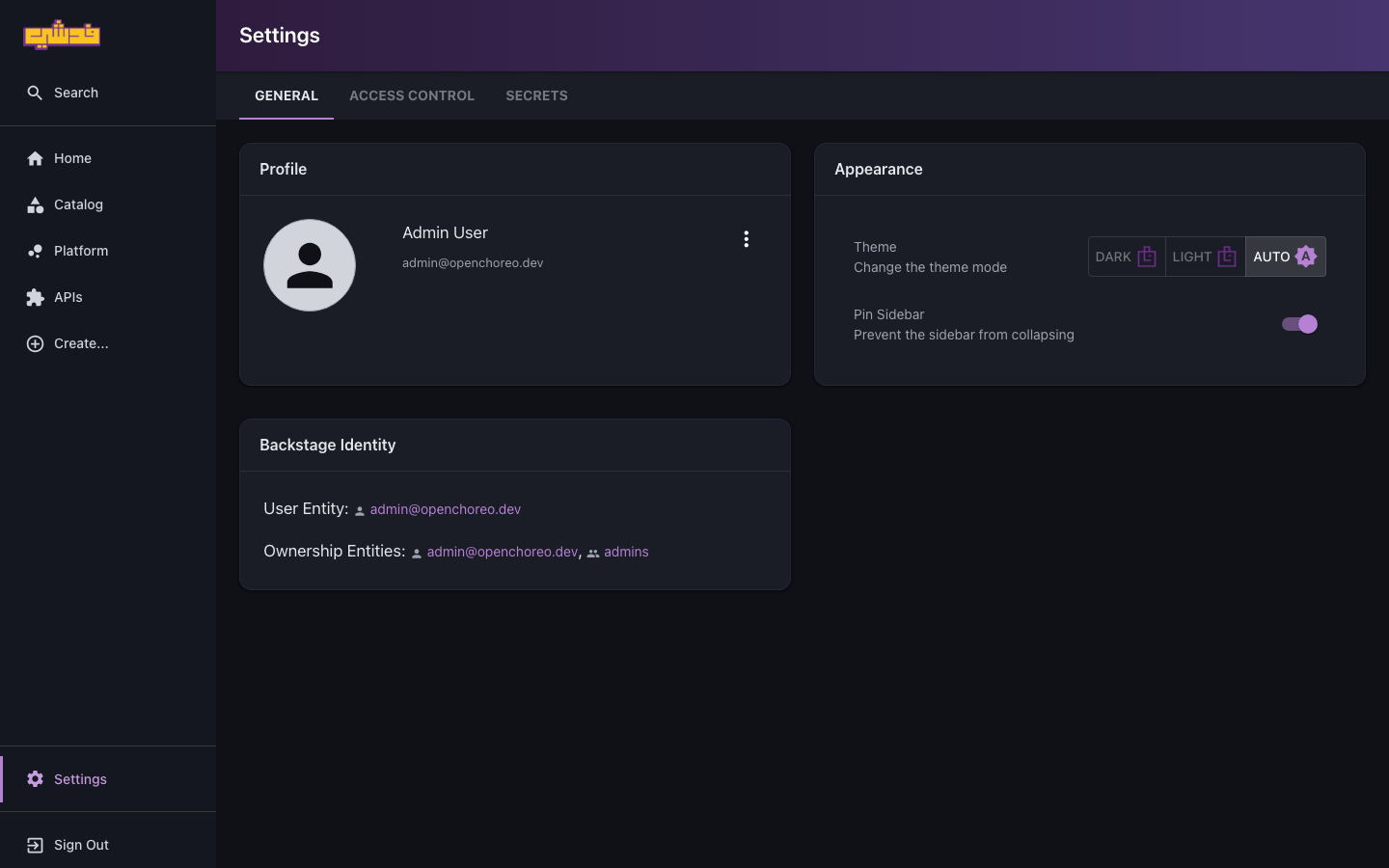
The rest of this page is how that owner is set and resolved.
How ownership resolves
The console reads the backstage.io/owner annotation during its catalog sync and writes it
to the entity's owner. It resolves an owner for each Project and Component along a fixed
precedence chain:
| Entity | Resolution order |
|---|---|
| Project | project annotation → configured defaultOwner |
| Component | component annotation → parent project annotation → defaultOwner |
Two consequences matter:
- A project's owner cascades to its components. Annotate the
checkoutproject once and every component inside it —cart-api,payment,order-history— inherits that owner. This is the common case: one team owns a whole project. - A component can override its project. If a single component belongs to a different team (a shared library maintained by the platform team but living inside an app project), annotate that component directly; the component-level value wins.
Empty or whitespace-only values are treated as unset and fall through to the next tier. Changes are picked up on the next sync cycle (about 30 seconds) — no restart or redeploy.
The annotation format
The value is a portal entity reference: <kind>:<namespace>/<name>. The two forms you'll
use:
group:default/checkout-team— owned by a team (the right default for most projects)user:default/alice.fedshi— owned by an individual
The referenced group or user must exist in the portal — typically populated from the Fedshi identity provider or an org-data source — for "owned by my team" filters and ownership-based views to resolve. If it doesn't exist, the entity still shows the literal owner string, but it won't match the filters.
Set ownership on a project
Annotating a project once owns everything inside it.
In the portal: set the owner when you create the project — the Create… → Project form
has an owner field that writes the backstage.io/owner annotation for you (see Orgs, projects,
and tenancy). To change it later, edit the
project's annotations from its catalog entity page.
Or with the occ CLI / kubectl — declaratively, in the manifest:
apiVersion: openchoreo.dev/v1alpha1
kind: Project
metadata:
  name: checkout
  namespace: fedshi
  annotations:
    backstage.io/owner: group:default/checkout-team
spec:
  deploymentPipelineRef:
    kind: DeploymentPipeline
    name: default
Or on an existing project with kubectl:
kubectl annotate project checkout -n fedshi \
  backstage.io/owner=group:default/checkout-team
This is why Onboard a team sets the annotation at project-creation time — ownership is correct from the first sync.
Override for one component
When a component belongs to a different team than its project:
apiVersion: openchoreo.dev/v1alpha1
kind: Component
metadata:
  name: shared-auth-lib
  namespace: fedshi
  annotations:
    backstage.io/owner: group:default/platform-team
spec:
  owner:
    projectName: checkout
  componentType:
    kind: ClusterComponentType
    name: deployment/service
kubectl annotate component shared-auth-lib -n fedshi \
  backstage.io/owner=group:default/platform-team
The checkout project still belongs to checkout-team; only shared-auth-lib is
attributed to platform-team.
APIs inherit automatically
The APIs the console surfaces are derived from a component's endpoints and automatically inherit that component's resolved owner — you never annotate them separately.
Two owner fields — don't confuse them
There are two things called "owner" on these resources; they do different jobs:
spec.owner(on a Component/Workload) is the Control Plane Operator structural link — which Project and Component a resource belongs to. Required, immutable, not about teams.metadata.annotations["backstage.io/owner"]is the catalog ownership this page is about — which team/person is responsible.
Set both: spec.owner to place the resource, the annotation to attribute it.
Verify ownership
After annotating, wait for the next sync (~30s) and check the Owner field on the Project or Component page in the Fedshi console. From the cluster side:
kubectl get project checkout -n fedshi \
  -o jsonpath='{.metadata.annotations.backstage\.io/owner}'
If the Owner field still shows the default after waiting, check that the key is exactly
backstage.io/owner (lowercase, with the dot) and the value is a well-formed reference
like group:default/checkout-team.
Default owner fallback
If neither a component nor its project carries the annotation, the portal falls back to the
configured defaultOwner. That fallback also covers every non-Project/Component entity. How
the default and the portal are configured is an operator concern — see the operator
portal branding and configuration guides.
What's next
- Onboard a team — set ownership as part of bringing a team on.
- Roles and access — the complementary "who can touch this".
- Portal guide — where ownership shows up in the console.