Component Types
A ComponentType is the single most important thing a platform engineer authors. It is the template a developer picks when they create a component — and by picking it, they accept the workload shape, the configurable parameters, the Kubernetes resources that get generated, and the builders they're allowed to use. Get your ComponentTypes right and developers self-serve safely without ever touching raw Kubernetes; the ComponentType is the golden path.
DevsPortal is built on the Control Plane Operator engine. ComponentType,
ClusterComponentType, the openchoreo.dev/v1alpha1 API group, and the occ CLI are
unchanged engine internals. Examples target the Fedshi instance.
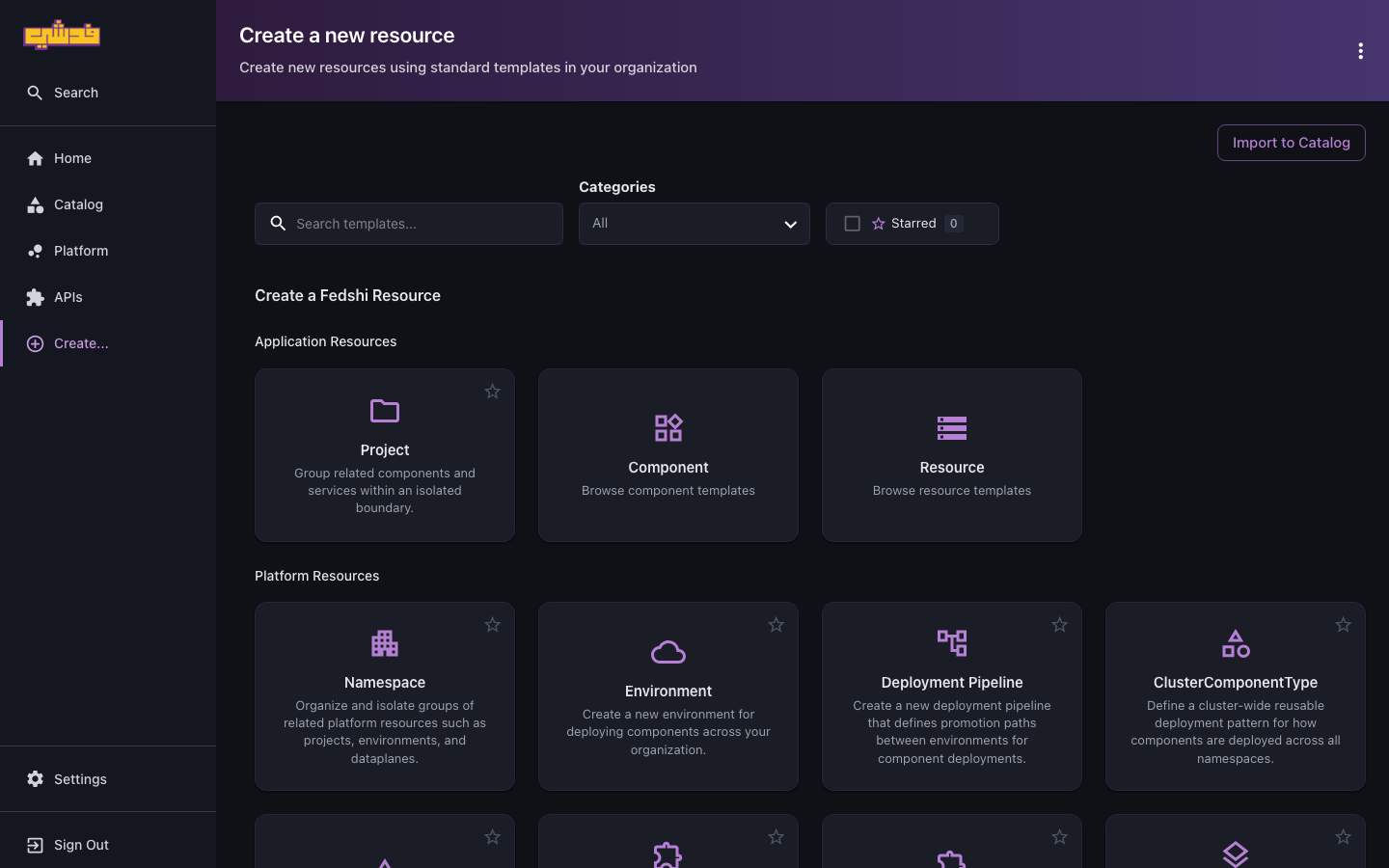
Author ComponentTypes from the portal's Create… templates — they open the in-portal YAML editor, pre-filled with the right kind and skeleton. The occ/YAML form below is for scripting, review, and GitOps. Authoring a ComponentType is genuinely schema and CEL work, so there's no no-YAML wizard — the portal just gives you the editor and validation.
Where you author them
In the portal: open Create… in the left nav and, under Platform Resources, pick the
ClusterComponentType template ("Define a cluster-wide reusable deployment pattern for how
components are deployed across all namespaces"). It opens the in-portal YAML editor seeded with
the ClusterComponentType kind, where you fill in the schema and resource templates described
below. For a namespace-scoped ComponentType, scroll the same Create… page to its template.
Or with the occ CLI: write the manifest and apply it — see Managing them with the
CLI below.
Why you author them
The platform ships with default ComponentTypes for common shapes — backend services, web apps, scheduled jobs. In most organizations those are a starting point, not the finish line. You author your own (or override the defaults) to:
- Bake in your standards — sane resource defaults, security contexts, labels, the gateway wiring your org uses.
- Add patterns the defaults don't cover — an internal-only gRPC service, a worker with a queue, a proxy.
- Enforce policy by construction — a developer literally cannot deploy something off-menu; they pick from what you published, and what they configure is validated against your schema.
The developer keeps a simple Component model and never sees a Deployment, Service, or HTTPRoute. You keep control of how every one of those is generated.
ComponentType vs ClusterComponentType
A ClusterComponentType is the cluster-scoped variant. They share the same spec; only scope differs. The platform's defaults ship as ClusterComponentTypes so every organization namespace sees them without duplication. Author a namespace-scoped ComponentType only when one org needs to customize or override a type for itself.
A ClusterComponentType is cluster-scoped, so its manifest must not set
metadata.namespace. If you copy from a namespace-scoped example, delete the namespace
field or the resource will fail validation.
The anatomy of a ComponentType
A ComponentType has four parts. Understanding the split between the two schemas is the key to authoring good ones.
| Part | Field | What it does |
|---|---|---|
| Workload kind | workloadType | The primary Kubernetes resource: deployment, statefulset, cronjob, job, or proxy |
| Parameter schema | parameters.openAPIV3Schema | What a developer sets once per release — same in every environment (replicas, ports) |
| Environment schema | environmentConfigs.openAPIV3Schema | What can be overridden per environment via a binding (CPU/memory, scaling) |
| Resource templates | resources | The Kubernetes manifests generated from the above, via CEL |
| Allowed workflows | allowedWorkflows | Which build Workflows developers may use |
| Allowed traits | allowedTraits | Which Traits may be attached |
Parameters vs environment configs
This distinction is what makes "build once, promote everywhere" work:
parametersare captured in the immutableComponentReleaseand applied identically wherever that release is deployed. Replica count, container port, image pull policy. To change a parameter, you create a new release.environmentConfigsare overridden per environment through aReleaseBinding. CPU and memory requests, scaling limits — the things that should differ between dev and prod while the release snapshot itself stays byte-for-byte identical.
Author generous limits in prod and tight ones in dev without a separate build, because that difference lives in the binding, not the release.
Both schemas use standard OpenAPI v3 JSON Schema (openAPIV3Schema), so you get defaults,
enums, minimum/maximum, and required for free — and the schema is self-documenting, which
is what the console's Create Component wizard renders fields from.
A representative example
A trimmed web-service ClusterComponentType: a Deployment, a Service, and an externally-routed
HTTPRoute generated per external endpoint.
apiVersion: openchoreo.dev/v1alpha1
kind: ClusterComponentType
metadata:
  name: web-service
spec:
  workloadType: deployment

  # Capabilities developers may attach
  allowedTraits:
    - kind: ClusterTrait
      name: autoscaler
    - kind: ClusterTrait
      name: persistent-volume

  # Builders developers may use (see Workflows)
  allowedWorkflows:
    - kind: ClusterWorkflow
      name: dockerfile-builder
    - kind: ClusterWorkflow
      name: gcp-buildpacks-builder

  # Set once per release — identical in every environment
  parameters:
    openAPIV3Schema:
      type: object
      properties:
        replicas:
          type: integer
          default: 1
          minimum: 1

  # Overridable per environment via ReleaseBinding
  environmentConfigs:
    openAPIV3Schema:
      type: object
      properties:
        resources:
          type: object
          properties:
            cpu:
              type: string
              default: "100m"
            memory:
              type: string
              default: "256Mi"

  resources:
    # Primary workload — id must match workloadType
    - id: deployment
      template:
        apiVersion: apps/v1
        kind: Deployment
        metadata:
          name: ${metadata.componentName}
          namespace: ${metadata.namespace}
          labels: ${metadata.labels}
        spec:
          replicas: ${parameters.replicas}
          selector:
            matchLabels: ${metadata.podSelectors}
          template:
            metadata:
              labels: ${metadata.podSelectors}
            spec:
              containers:
                - name: main
                  image: ${workload.container.image}
                  resources:
                    requests:
                      cpu: ${environmentConfigs.resources.cpu}
                      memory: ${environmentConfigs.resources.memory}

    - id: service
      template:
        apiVersion: v1
        kind: Service
        metadata:
          name: ${metadata.componentName}
          namespace: ${metadata.namespace}
        spec:
          selector: ${metadata.podSelectors}
          ports: ${workload.toServicePorts()}

    # One HTTPRoute per external endpoint — note forEach + the visibility filter
    - id: httproute-external
      forEach: '${workload.endpoints.transformList(name, ep, ("external" in ep.visibility && ep.type in ["HTTP", "GraphQL", "Websocket"]) ? [name] : []).flatten()}'
      var: endpoint
      template:
        apiVersion: gateway.networking.k8s.io/v1
        kind: HTTPRoute
        metadata:
          name: ${oc_generate_name(metadata.componentName, endpoint)}
          namespace: ${metadata.namespace}
        spec:
          parentRefs:
            - name: ${gateway.ingress.external.name}
              namespace: ${gateway.ingress.external.namespace}
          rules:
            - backendRefs:
                - name: ${metadata.componentName}
                  port: ${workload.endpoints[endpoint].port}
Three template mechanisms are doing the work here, and they're the heart of authoring:
- CEL interpolation —
${parameters.replicas},${workload.container.image}pull values from the developer's parameters, the workload, and platform-injectedmetadata/gatewaycontext into the manifest. forEach+var— generate N resources from a list (here, one HTTPRoute per matching endpoint). The expression filters by endpoint visibility, so an internal endpoint never gets an external route. This is how a ComponentType turns a developer's declared endpoints into the right networking automatically.includeWhen(not shown) — a boolean CEL expression that conditionally emits a resource (e.g. only create a Certificate when TLS is enabled).
Built-in helpers like oc_generate_name(), oc_merge(), and oc_dns_label(), plus the full
metadata/parameters/workload/gateway context, are documented in the CEL reference linked
below.
Validation rules
Beyond JSON-Schema validation of individual fields, a ComponentType can carry CEL-based
validation rules in a validations section for cross-field, semantic checks — "if HTTPS is
enabled, a certificate ref is required", "max replicas must exceed min replicas". These run when
a developer's configuration is evaluated and surface as clear errors, so a misconfigured
component is rejected up front rather than producing a broken deployment. The field-level syntax
is in the upstream validation-rules reference.
How developers consume it
Once published, a developer references your ComponentType and supplies parameter values that conform to your schema:
apiVersion: openchoreo.dev/v1alpha1
kind: Component
metadata:
  name: cart-api
  namespace: fedshi
spec:
  owner:
    projectName: checkout
  componentType:
    kind: ClusterComponentType
    name: deployment/web-service
  parameters:
    replicas: 2
  traits:
    - name: autoscaler
      kind: ClusterTrait
      instanceName: hpa
      parameters:
        maxReplicas: 5
A few consequences of your design land here:
- The
nameisworkloadType/name(deployment/web-service), and developers must setkind: ClusterComponentTypeexplicitly to use the platform defaults. - They can only attach Traits you listed in
allowedTraits, and only build with Workflows you listed inallowedWorkflows— a component that references a disallowed workflow stops in aWorkflowNotAllowedstate (see governance and guardrails). - Per-environment overrides go in the binding (
componentTypeEnvironmentConfigs), against yourenvironmentConfigsschema — which is exactly how the same release runs lean in dev and generous in prod.
The developer side of this is documented in projects and components.
Managing them with the CLI
occ clustercomponenttype list
occ clustercomponenttype get web-service
occ componenttype list -n fedshi
occ apply -f web-service.yaml
Deep reference
The field-level syntax — the full openAPIV3Schema features, every CEL context variable and
built-in function, forEach/includeWhen/var semantics, and validation rules — is documented
upstream:
- Authoring ComponentTypes and Traits (templating, schema, validation).
- CEL reference — context variables and built-in functions.
- API and CRDs — the DevsPortal pointer into the CRDs.
What's next
- Traits — the composable capabilities your ComponentType allows.
- Workflows — the builders your
allowedWorkflowsreferences. - Governance and guardrails — how the ComponentType menu becomes a guardrail.