Orgs, Projects, and Tenancy
Before a single developer ships anything, the platform engineer decides where their work lives. That structure — organizations and projects — is the multi-tenant skeleton of DevsPortal: it determines who can see whom, where workloads actually run, and how one team's mistake stays one team's problem. This page is the model you set up; the onboarding runbook is the step-by-step that applies it to a real team.
DevsPortal is built on the Control Plane Operator engine. The control-plane
namespaces, the openchoreo.dev/control-plane label, and the Project /
DeploymentPipeline resources below are unchanged engine internals. Examples target the
Fedshi instance.
Start from the portal's self-service templates; the occ/YAML form below is for scripting, review, and GitOps.
Two levels of tenancy
DevsPortal gives you two nested boundaries to divide the platform with. They map onto different infrastructure and serve different purposes:
| Boundary | What it is | What it isolates | Lives on |
|---|---|---|---|
| Organization | A control-plane Kubernetes namespace, labeled openchoreo.dev/control-plane: true | All the platform resources for one org/business unit — its projects, environments, pipelines, and any namespace-scoped golden paths | The control plane |
| Project | A bounded context inside an org — a logical group of related components | A team's runtime cell: its own data-plane namespace and network policies | The data plane (one per environment) |
Hold it this way: the organization namespace is the wall between business units on the
control plane; the project is the wall between teams' workloads at runtime. Most
single-customer instances run everything in one organization namespace and use projects as the
primary team boundary — that's how Fedshi is set up, with the fedshi namespace
holding checkout, catalog, and storefront projects.
Organizations: control-plane namespaces
An organization is just a control-plane namespace that DevsPortal recognizes. Everything a platform engineer creates starts from the same place in the console — the Create… page, which lists the standard templates for both application resources and platform resources:
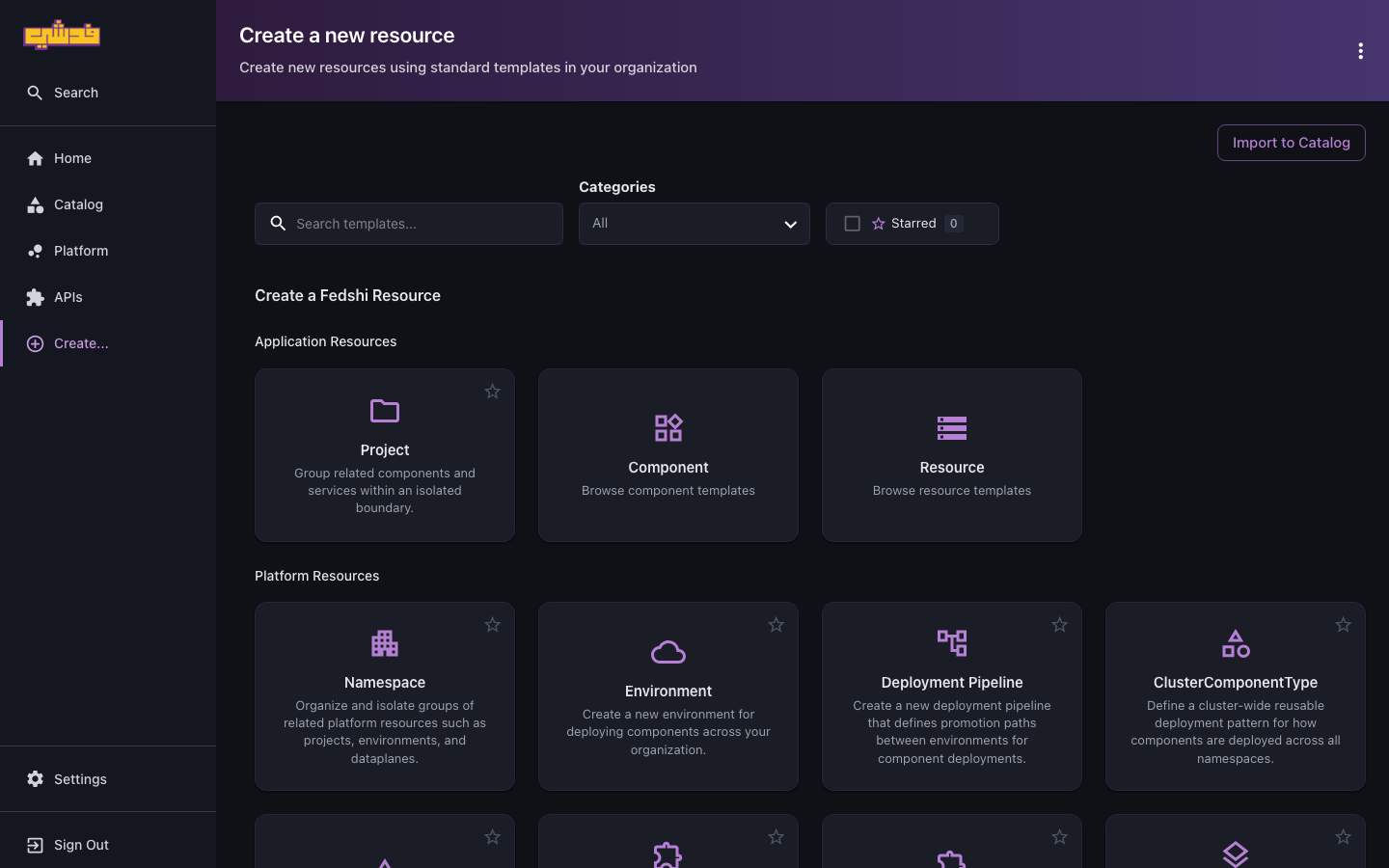
In the portal: open Create… in the left nav, and under Platform Resources pick the
Namespace template ("Organize and isolate groups of related platform resources such as
projects, environments, and dataplanes"). Fill in the name (e.g. fedshi) and create it — the
portal applies the openchoreo.dev/control-plane: true label that makes the namespace a tenant.
Or with the occ CLI / kubectl: the engine discovers namespaces by that label, so a new
org is two commands:
kubectl create namespace fedshi
kubectl label namespace fedshi openchoreo.dev/control-plane=true
That label is what makes the namespace a tenant. The control plane uses it to list and manage platform resources; without it, the namespace is invisible to the platform. The namespace you install into is labeled automatically, which is why most instances start with one ready-made organization.
What a new organization inherits for free
The platform admin's install registers the shared golden paths and planes as cluster-scoped
resources — ClusterComponentType, ClusterTrait, ClusterResourceType, ClusterWorkflow,
ClusterDataPlane, ClusterWorkflowPlane, ClusterObservabilityPlane. Because these are
cluster-scoped, every organization namespace sees them out of the box. A brand-new org can
deploy immediately against the platform's standard menu without you copying anything.
What an organization does need before developers can work in it is a small set of namespace-scoped resources:
- At least one Environment (see Environments and pipelines).
- At least one DeploymentPipeline binding those environments into a promotion path.
- At least one Project for a team to work in.
When to create a second organization
Reach for a separate organization namespace when business units must be cryptographically and operationally separate — different cost centers, compliance domains, or customers on a shared platform. For teams that merely need their own space within one business, a project is the right boundary, not a new org. Don't multiply organization namespaces to model teams; that's what projects are for.
If an org needs physically isolated infrastructure (its own data plane, its own ComponentTypes that override the cluster defaults), you create namespace-scoped variants inside that namespace — they shadow the cluster-scoped defaults for that org only. That's an advanced case; most orgs ride on the shared cluster-scoped resources.
Projects: bounded contexts and runtime cells
A Project is where a team actually works. It does two jobs at once:
- A bounded context — a logical home for the components that implement one business
capability (a domain).
checkout,catalog,storefronteach group the services that belong together. - A runtime cell — when a project's components deploy, the platform gives the project its
own namespace on the data plane, per environment, with network policies. That cell is the
isolation boundary at runtime: a component in
checkoutcannot reach a component incatalogunless an endpoint is deliberately exposed atnamespace(or broader) visibility.
A project binds to a DeploymentPipeline, which fixes the promotion path its components
travel (e.g. development → staging → production). That binding is what connects a team's
bounded context to the delivery structure you author in
Environments and pipelines.
Creating a project
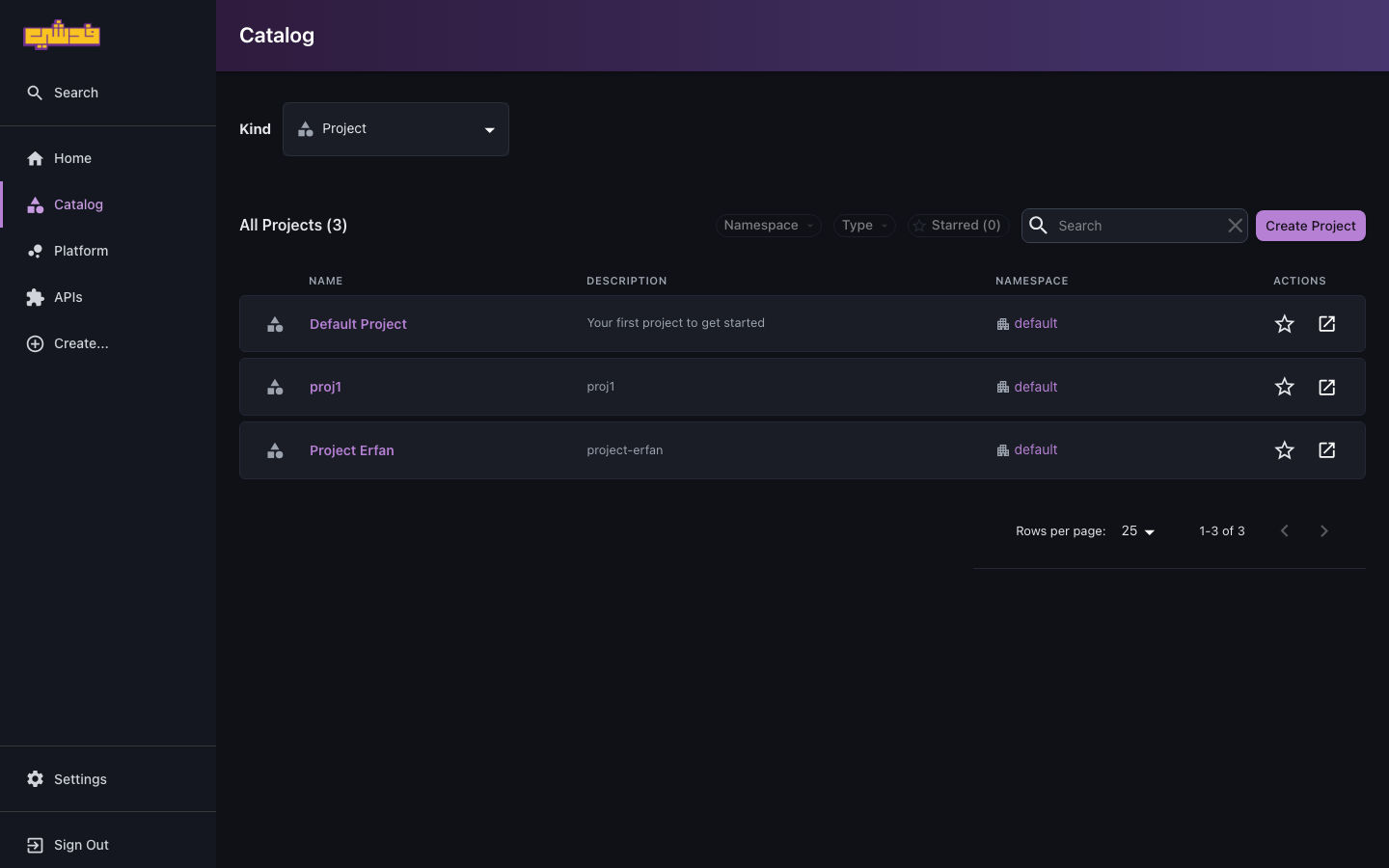
In the portal: open Create… and pick the Project template under Application Resources ("Group related components and services within an isolated boundary"). Give it a name, description, owner, and the deployment pipeline it binds to, then create it. You can also start from the Catalog: set the Kind filter to Project and use the Create Project button — the same project list is where you'll find every project afterward, with Namespace and Type filters to narrow it down.
Or with the occ CLI:
# checkout-project.yaml
apiVersion: openchoreo.dev/v1alpha1
kind: Project
metadata:
  name: checkout
  namespace: fedshi
  annotations:
    openchoreo.dev/display-name: "Checkout"
    openchoreo.dev/description: "Cart, payment, and order-history services"
    backstage.io/owner: group:default/checkout-team
spec:
  deploymentPipelineRef:
    kind: DeploymentPipeline
    name: default
occ apply -f checkout-project.yaml
occ project get checkout -n fedshi
The backstage.io/owner annotation set here cascades to every component in the project — see
Ownership model. Setting it at creation time means the project is
attributed to its team from the first catalog sync.
How the two boundaries deliver isolation and self-service
The whole point of this structure is to resolve a tension that usually defeats internal platforms: strong isolation and friction-free self-service. DevsPortal gets both by separating what developers express from how it runs.
- Isolation comes from the cell model. Each project is its own data-plane namespace with network policies, so a team's blast radius stops at the project boundary. Cross-project and external traffic only flow where an endpoint is intentionally exposed — see workloads and endpoints → visibility.
- Self-service comes from the golden paths the org inherits — the ComponentTypes, Traits, ResourceTypes, and Workflows developers pick from. Inside those, a team creates, deploys, and promotes on its own, with no tickets, because everything they can do is already approved.
Access control is the third leg: roles scoped to a project keep a team's people inside the same boundary the cell keeps their workloads inside. That's covered in Roles and access.
The structure on Fedshi
The Fedshi instance is a single-organization setup that uses projects as the team boundary:
fedshi (organization namespace — openchoreo.dev/control-plane: true)
├── Environments: development, staging, production
├── DeploymentPipeline: default (development → staging → production)
└── Projects
    ├── checkout    → owned by checkout-team   → cell per environment
    ├── catalog     → owned by catalog-team     → cell per environment
    └── storefront  → owned by storefront-team   → cell per environment
Every project rides on the shared cluster-scoped golden paths the platform admin installed, and each is its own isolated runtime cell. Adding a team is adding a project (and its access) — not re-architecting the platform.
What's next
- Onboard a team — apply this structure end to end for a real team.
- Environments and pipelines — author the promotion paths projects bind to.
- Roles and access — scope people to projects the way the cell scopes workloads.
- Platform admin: architecture and topology — the planes these namespaces and cells run on.