Environments and Pipelines
A developer who runs occ component deploy --to staging is walking a path you laid down.
Environments define the stages a release can land in, and a DeploymentPipeline defines
how a release is allowed to move between them. Together they are the delivery structure of an
organization — the part of the golden path that governs where and in what order code goes
live. This page is how you author that structure.
DevsPortal is built on the Control Plane Operator engine. The Environment and
DeploymentPipeline resources, the openchoreo.dev/v1alpha1 API group, and the occ CLI are
unchanged engine internals. Examples target the Fedshi instance.
Start from the portal's self-service templates — Create… → Environment and Create… → Deployment Pipeline; the occ/YAML form below is for scripting, review, and GitOps.
Both resources have a template on the portal's Create… page, under Platform Resources:
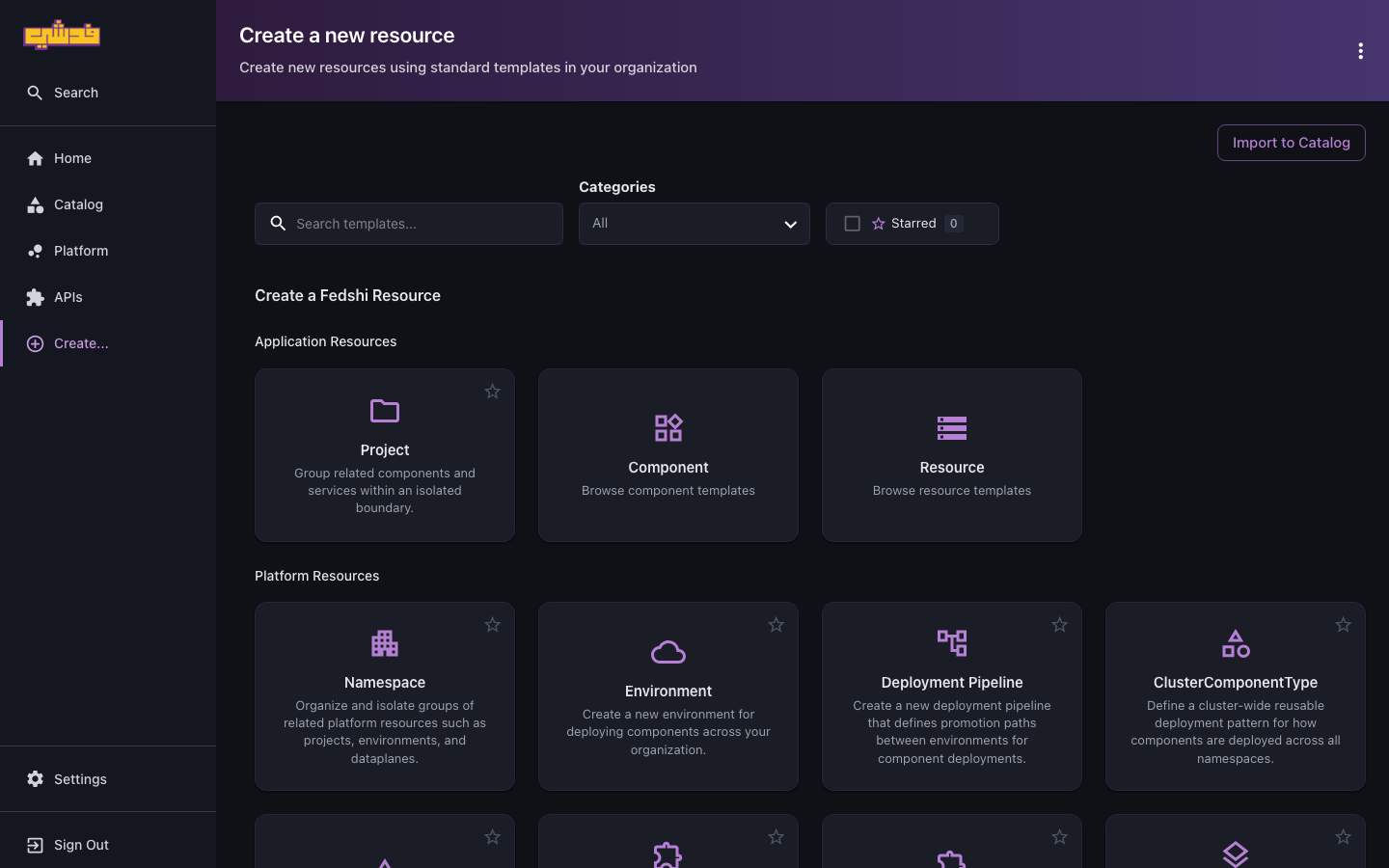
What an Environment is
An Environment is a first-class stage in the delivery lifecycle — development, staging,
production, or whatever your org uses. It is not just a label: an Environment maps to a
data plane, which is the cluster where workloads for that stage actually run. That mapping is
the Environment's main job. It also marks whether the stage is production, which downstream
governance keys off.
Because the mapping is explicit, you can shape your topology however you need:
- Point
developmentandstagingat one shared, smaller data plane andproductionat a dedicated, high-availability one. - Point a
eu-productionand aus-productionEnvironment at two regional data planes for geographic distribution. - Give a regulated stage its own compliance-isolated data plane.
In the portal: open Create… and pick the Environment template ("Create a new environment for deploying components across your organization"). Name the stage, choose the data plane it maps to, and mark whether it's production, then create it.
Or with the occ CLI:
# development-environment.yaml
apiVersion: openchoreo.dev/v1alpha1
kind: Environment
metadata:
  name: development
  namespace: fedshi
  annotations:
    openchoreo.dev/display-name: "Development"
    openchoreo.dev/description: "Shared development stage"
spec:
  dataPlaneRef:
    kind: ClusterDataPlane
    name: default
  isProduction: false
occ apply -f development-environment.yaml
occ environment list -n fedshi
Define one Environment resource per stage in the organization namespace. A production stage is
identical except isProduction: true and (usually) a dataPlaneRef pointing at a dedicated
data plane the platform admin registered.
Which data planes exist, and what ClusterDataPlane / DataPlane names you can reference, is a
platform-admin concern. Confirm the available planes before you write dataPlaneRef — see the
platform-admin architecture and topology guide.
What a DeploymentPipeline is
A DeploymentPipeline declares the promotion paths between Environments — which stage a release can advance to from which. It is the org's delivery process expressed as data: declarative, reviewable, and the same for every team that binds to it.
In the portal: open Create… and pick the Deployment Pipeline template ("Create a new deployment pipeline that defines promotion paths between environments for component deployments"). Name it and wire the source-to-target promotion paths between the Environments you defined above, then create it.
Or with the occ CLI — the core field is promotionPaths, a list of source-to-target
rules. A simple linear pipeline:
# default-pipeline.yaml
apiVersion: openchoreo.dev/v1alpha1
kind: DeploymentPipeline
metadata:
  name: default
  namespace: fedshi
  annotations:
    openchoreo.dev/display-name: "Default Pipeline"
    openchoreo.dev/description: "development → staging → production"
spec:
  promotionPaths:
    - sourceEnvironmentRef:
        name: development
      targetEnvironmentRefs:
        - name: staging
    - sourceEnvironmentRef:
        name: staging
      targetEnvironmentRefs:
        - name: production
occ apply -f default-pipeline.yaml
occ deploymentpipeline get default -n fedshi
A release deployed to the first environment can only be promoted to a target the pipeline allows. There is no "deploy straight to production" path unless you wrote one — the pipeline is itself a guardrail.
Parallel paths and richer topologies
targetEnvironmentRefs is a list, so a single source can fan out. This lets you model real
delivery shapes:
spec:
  promotionPaths:
    - sourceEnvironmentRef:
        name: development
      targetEnvironmentRefs:
        - name: qa
        - name: preproduction      # promote dev into either branch
    - sourceEnvironmentRef:
        name: qa
      targetEnvironmentRefs:
        - name: production
    - sourceEnvironmentRef:
        name: preproduction
      targetEnvironmentRefs:
        - name: production          # two paths converge on production
Use parallel paths for fan-out (a release that must pass both QA and a pre-prod soak), regional rollouts (one source promoting to several regional productions), or different release classes that take different routes to prod.
How this shapes the developer's experience
Everything you define here surfaces directly in the developer's deploy and promote flow:
- A project binds to one pipeline (
Project.spec.deploymentPipelineRef), so a team inherits exactly the stages and paths you authored. Set this when you create the project. - A new release lands in the first environment in the pipeline (automatically when the
component sets
autoDeploy: true). - The console's Deploy tab renders one card per Environment, and the Promote button is
only offered where a promotion path exists.
occ component deploy --to <env>succeeds only for an allowed target. - The same immutable release moves up the chain — the byte-for-byte artifact validated in dev is what reaches production. Per-environment differences (replica counts, resource limits) come from environment overrides on the binding, not from rebuilding.
So the pipeline you write is, quite literally, the buttons the developer gets to press.
Gating promotions
A pipeline says which promotions are possible; it's often paired with policy that says who may perform a given hop and when. The common pattern is to let any developer promote up to staging but restrict the final hop into a production Environment:
- RBAC + CEL conditions. Bind the team's
developerrole with a condition that forbids mutating release bindings in production, so only operators can ship the last hop. The exact mechanism is in Roles and access → conditions and the rationale in Governance and guardrails → promotion gates. isProduction. Marking the production Environment lets conditions and policies key off "is this prod?" cleanly.
Because each promotion is just a binding to a named release, the whole flow is auditable (every hop is recorded) and reversible (rollback is deploying an earlier release) — without a change-advisory board.
Putting it together for a team
To stand up delivery for an organization:
- Define one Environment per stage, each with its
dataPlaneRefandisProductionflag. - Define one (or a few) DeploymentPipeline wiring those environments into promotion paths.
- Bind each project to the pipeline that fits its release process.
- Gate the production hop with RBAC conditions for teams that shouldn't self-promote to prod.
After that, developers deploy and promote within the structure with no further setup from you.
Reference
- Field-level reference for both resources lives upstream: Control Plane Operator concepts and the API reference.
- API and CRDs — the DevsPortal pointer into those CRDs.
- Environment map — the concrete environments on this instance.
What's next
- Orgs, projects, and tenancy — where projects bind to the pipeline you just authored.
- Governance and guardrails — gates and policy on promotions.
- Developers: deploy and promote — the experience this structure produces.